
Analyzing Tableau Workbooks with Fewer Tokens (feat. Claude)

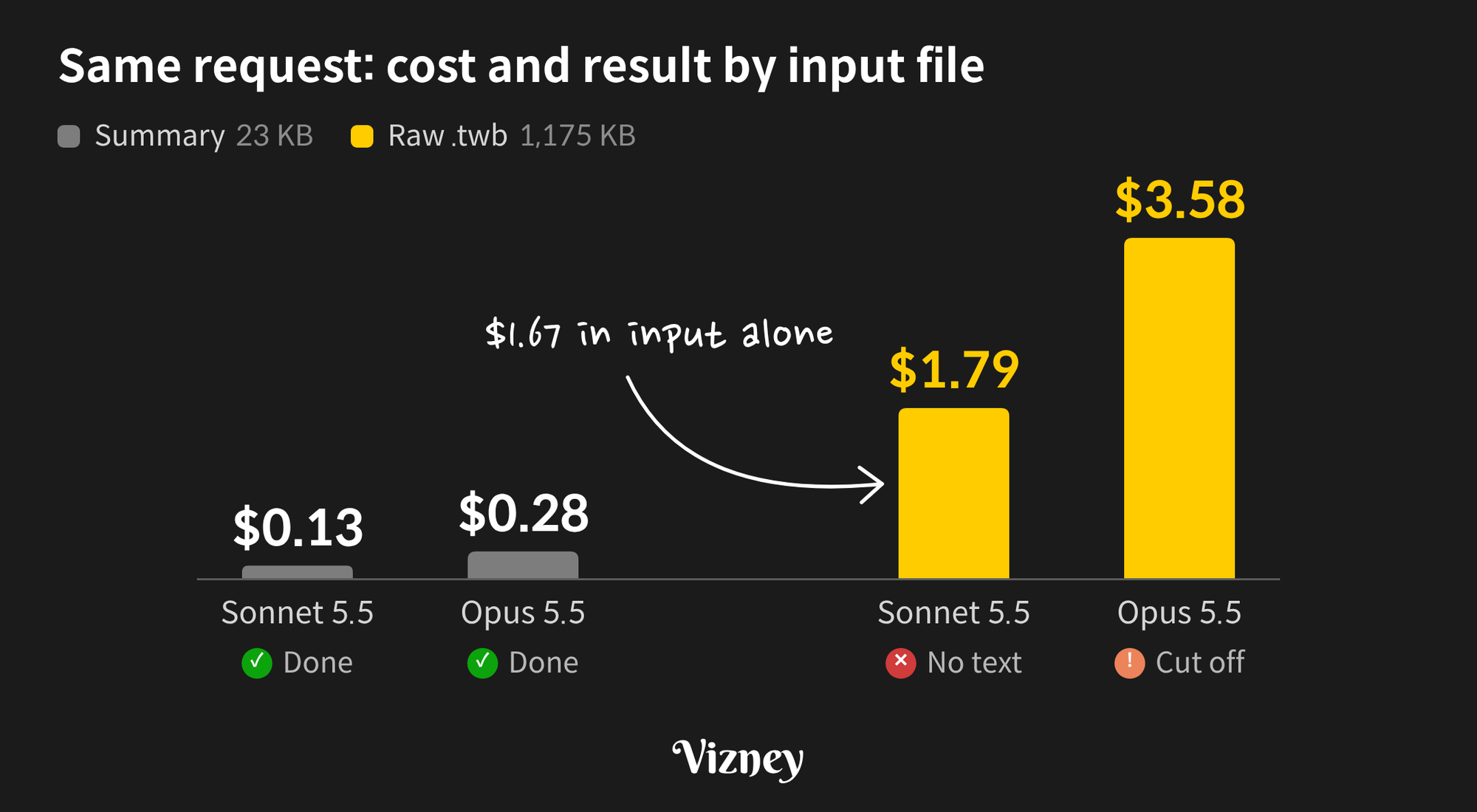
When you analyze a Tableau workbook (.twb) with Claude, token usage depends far more on what Claude reads than on which model you use. For the Superstore sample, a summary of only the elements you need came to 1.3% of the raw file’s tokens. On the same handover-document request, Claude finished the document from the summary for less than a tenth of the cost. From the raw file, it hit the output limit before finishing.
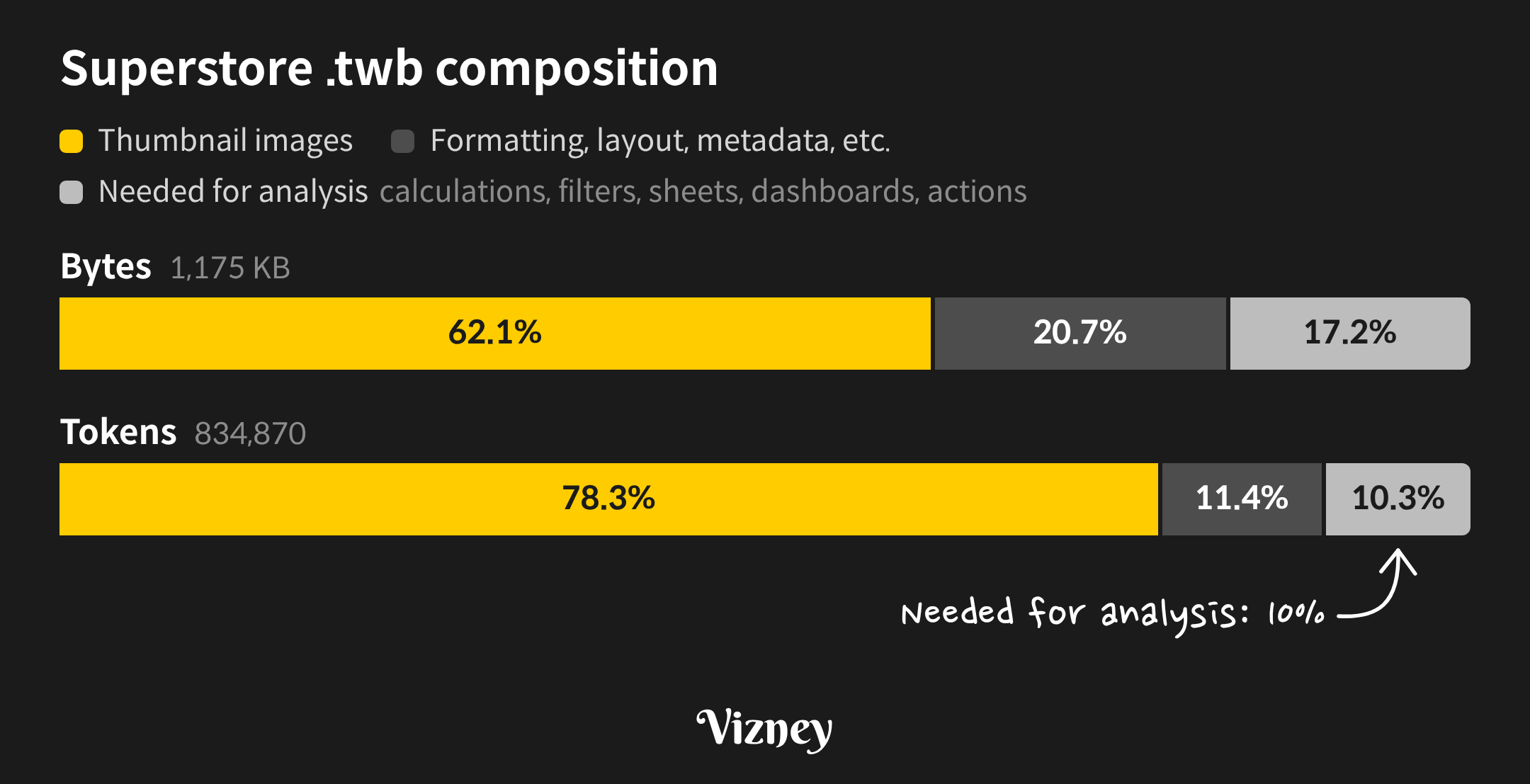
Saved as a .twb from Tableau Desktop 2026.2, the Superstore sample is 1,175 KB, or 834,870 tokens. Thumbnail images make up 78% of those tokens. The calculations, filters, sheets, dashboards, and actions the analysis needs make up only 10%. Thumbnails are images stored as base64 text, so they produce more than twice as many tokens as the same amount of XML.
1. Get the .twb file.
Save the workbook you want to analyze as a .twb. If you have a .twbx, unpackage it and keep only the .twb. The analysis doesn’t need the data.
2. Attach the .twb with this prompt to create a summary file.
I want to analyze the attached Tableau workbook (.twb). Don't read or print
the raw XML. Use Python to extract only the elements below and save them
to workbook_summary.md.

[1] Extract: data sources (connections, table relationships, custom SQL,
    data source filters, extract filters), parameters, calculated fields
    (formula and comment), each sheet's rows, columns, marks, and filters,
    the sheets and controls on each dashboard, and actions
[2] Skip: thumbnails, external, metadata-records, style, windows, devicelayouts
[3] Skip each sheet's datasource-dependencies, which repeat the data
    source's field definitions, but keep calculations that exist only
    there (ad-hoc calculations).
[4] Replace internal names in formulas and shelves ([Calculation_…],
    [Parameter 1]) with display names.

After saving, report only the file size and the count of each item.- First and last lines: These keep the raw file and the summary out of the conversation. Anything left in the conversation is processed again with every later message.
- [3]: Ad-hoc calculations typed directly on a shelf are stored only inside the sheet, so they need to be kept separately.
- [4]: Without this line, Profit Ratio stays in the summary under an internal name like
[Calculation_9921103144103743].
Run with Sonnet, the prompt produced a 23 KB summary (10,833 tokens).
3. Continue in a new conversation with only the summary attached.
Attach the summary to a new conversation and ask something like “Write a handover document based on this summary.” Conversation length and attachment size count toward usage limits. A new conversation is therefore lighter than one that still carries the extraction work. If you’ll keep working on the same workbook, add the summary to a project. Project content is cached and counts less against your limits.
To compare cost and results, the same request was sent through the Claude API with the raw file and with the summary. The test used the Korean edition of the summary and request.
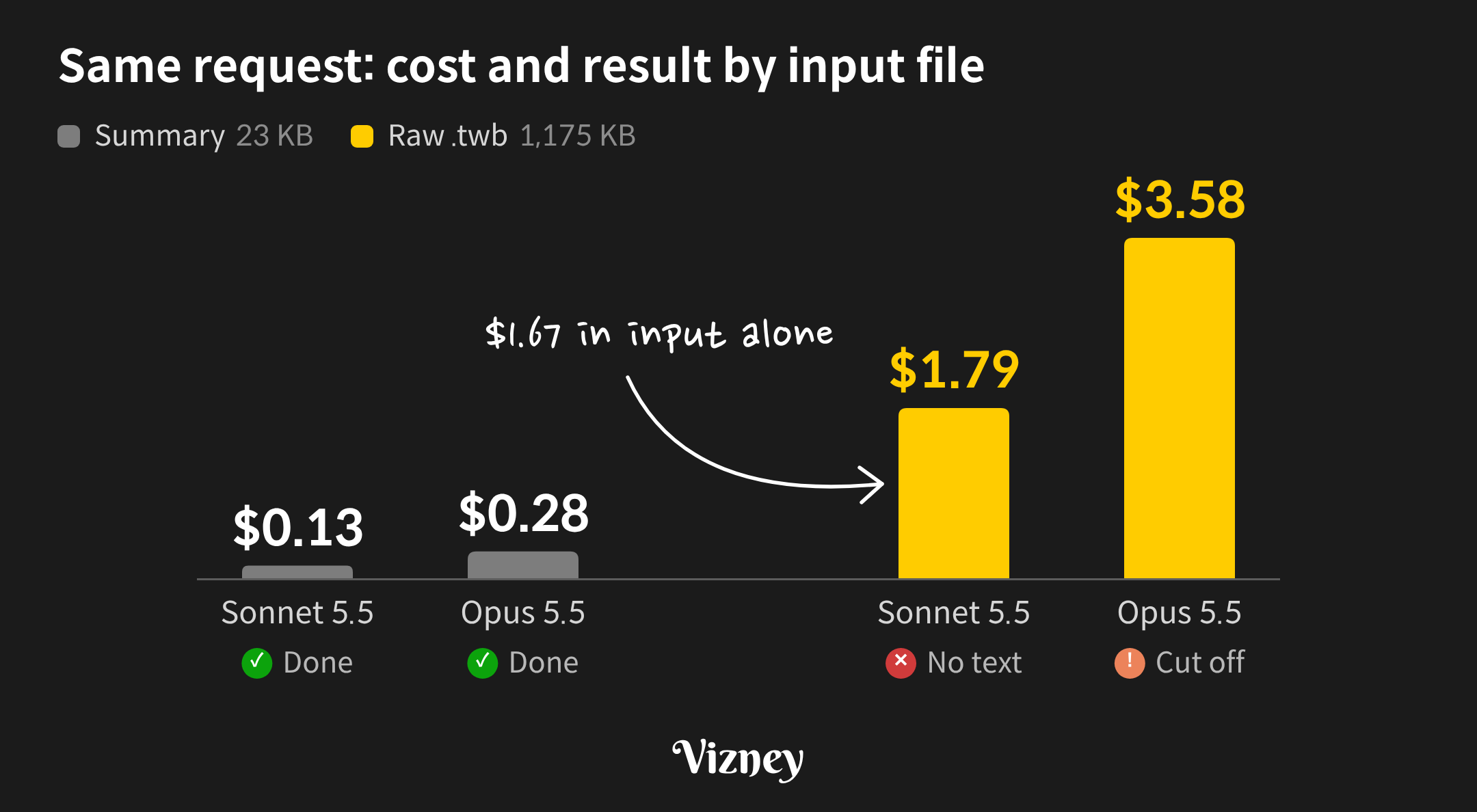
Reading the summary, both Sonnet 5.5 and Opus 5.5 finished the document. Reading the raw file cost $1.67 in input alone on Sonnet. Neither model finished within the 12,000-token output limit set for the test. Sonnet spent the whole limit on thinking and wrote no document text. Opus was cut off while listing actions.
4. Match the model to the step.
- Volume over price: Fable 5.1, Opus 5.5, Sonnet 5.5, and Haiku 5.5 all returned the same token count for the same file. Switching models changes only the price. Sonnet 5.5 costs half as much as Opus 5.5. Even so, in the test above, Opus reading the summary finished the document for about a sixth of what Sonnet spent on the raw file.
- Splitting the roles: Sonnet handles extraction well. Give Opus the logic where LOD expressions, parameters, and actions interact.
- Switching models: If you split the work between models, do it in a conversation that starts from the summary. If you switch models in a conversation that has already read the raw file, the new model inherits that whole conversation.
Notes
- The summary keeps connection details and file paths as they appear in the workbook, so review it before sharing.
- The summary doesn’t include dashboard text objects such as titles. To include them, add “dashboard titles and text objects” to [1] in the prompt.
- Running Python requires Claude’s Code execution and file creation setting.