
Maximizing Tableau URL Actions: 5 Useful Links for Your Dashboards


You can allow users to jump straight to relevant web search results simply by clicking a specific 'product' or 'client' on a dashboard. Tableau’s 'Go to URL' action eliminates the need to manually open a new browser tab and type search queries.
Simply navigate to [Worksheet] > [Actions] > [Go to URL] and append a data field to a base URL string. Here are five practical URL formats you can copy and use immediately in your business dashboards.
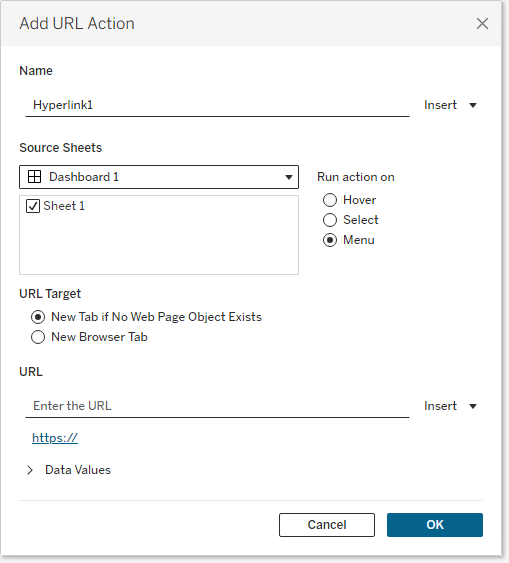
1. General Web Search (Google)
The most versatile action for instantly looking up unknown product names, categories, or keywords.
https://www.google.com/search?q=<Field_Name>
2. Google Maps Location Search
Highly synergistic when paired with geographic dashboards analyzing store locations, warehouses, or delivery routes.
https://www.google.com/maps/search/?api=1&query=<Location_Field_Name>
3. Wikipedia Encyclopedia Search
Perfect for dashboards dealing with medical terms, complex product hierarchies, or items requiring detailed definitions.
https://en.wikipedia.org/wiki/<Term_Field_Name>
4. LinkedIn Business Search
Ideal for B2B Sales or HR dashboards. Click on a 'Company Name' or 'Person' to immediately view their business profile.
https://www.linkedin.com/search/results/all/?keywords=<Company_or_Person_Field_Name>
5. Direct Email to Assignee (Mailto)
If an action needs to be taken immediately based on the data, you can trigger the user's default email client instead of opening a web page.
mailto:<Assignee_Email_Field>?subject=Dashboard Inquiry