
Tableau Agent Data Security: What Reaches the LLM in Tableau Cloud vs. Tableau Server

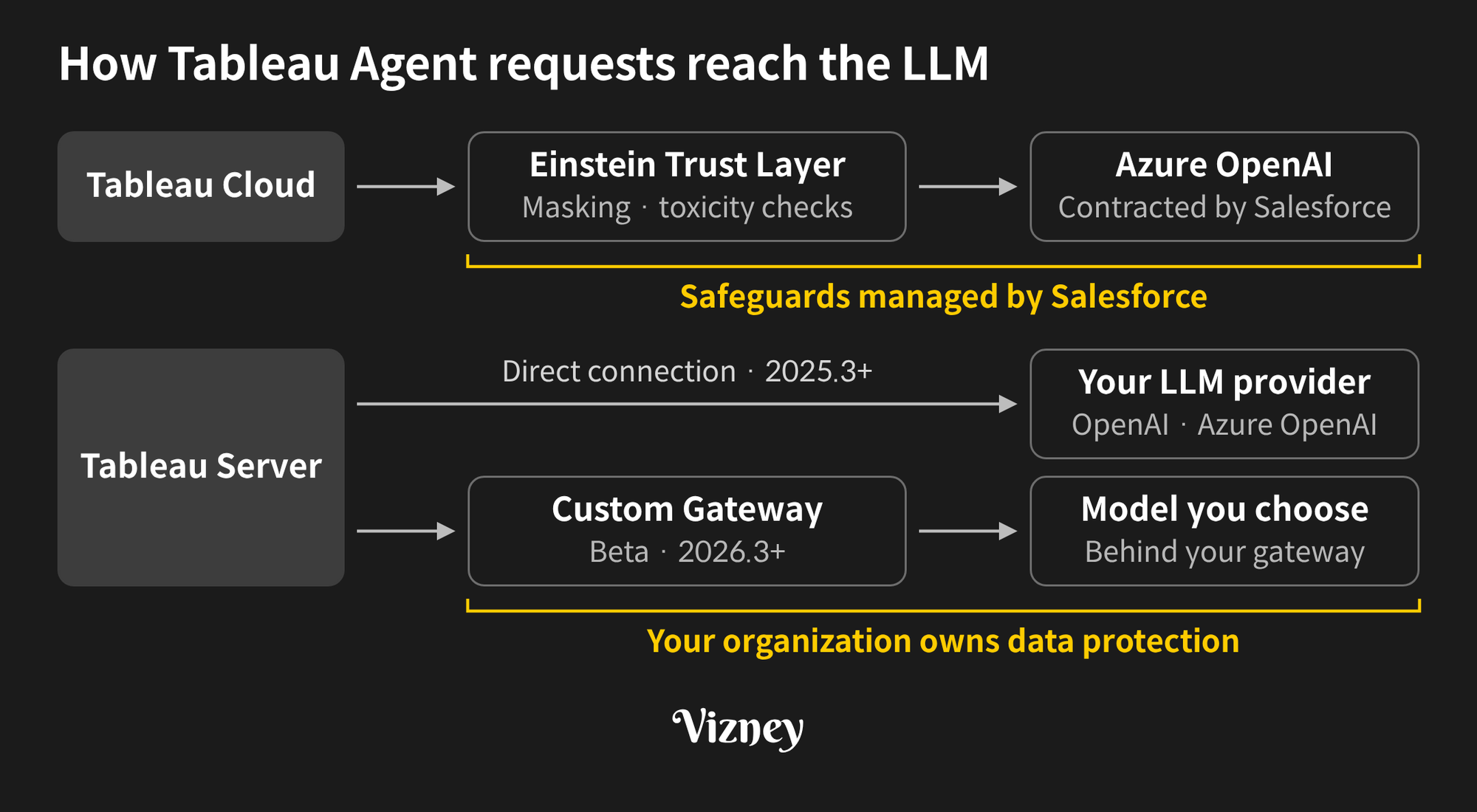
To get Tableau Agent through a security review, you need to explain what data it sends and which LLM receives it. Tableau Agent sends more than metadata such as field names: it also sends samples of actual values, and the path depends on your deployment. In Tableau Cloud, requests pass through the Einstein Trust Layer to Azure OpenAI models covered by Salesforce's agreements. In Tableau Server, they go to the LLM provider your organization connects.
Starting with version 2026.3, Tableau Server also supports a Custom Gateway (Beta), which routes AI requests through your corporate LLM gateway so your organization chooses the model behind it. The Tableau 2026.3 release introduces it as Bring Your Own LLM (BYOLLM).
1. What data does Tableau Agent send to the LLM?
The LLM doesn't receive your entire data source. It receives the context it needs to turn a question into a viz or a query, and Tableau runs the query against your data. Based on AI in Tableau and Data Usage and AI in Tableau and Trust, what gets sent depends on the moment:
- When a session starts: Tableau builds a summary of the data source and sends it to the LLM. The summary includes field captions, descriptions (first 150 characters), data roles, and data types, plus up to 1,000 sampled unique values from string fields.
- When you ask a question: Tableau sends your prompt, metadata describing the current state of the viz or Tableau Prep flow, and the conversation history. For viz authoring, this includes each field's default aggregation and calculation formulas.
- In dashboards: Tableau Agent in Dashboards sends an image of the dashboard to generate overviews and insights. For Dashboard Q&A, it sends filter names and values, table and column names, and a small sample of field values. Starting in 2026.3.1, it automatically samples up to 50 text dimensions per data source and up to 100 distinct values per field.
For example, if a data source contains Customer Name, Email, Region, and Sales, the moment Tableau Agent opens, the values of the string fields Customer Name, Email, and Region are sent along with the metadata. The numeric field Sales sends metadata only.
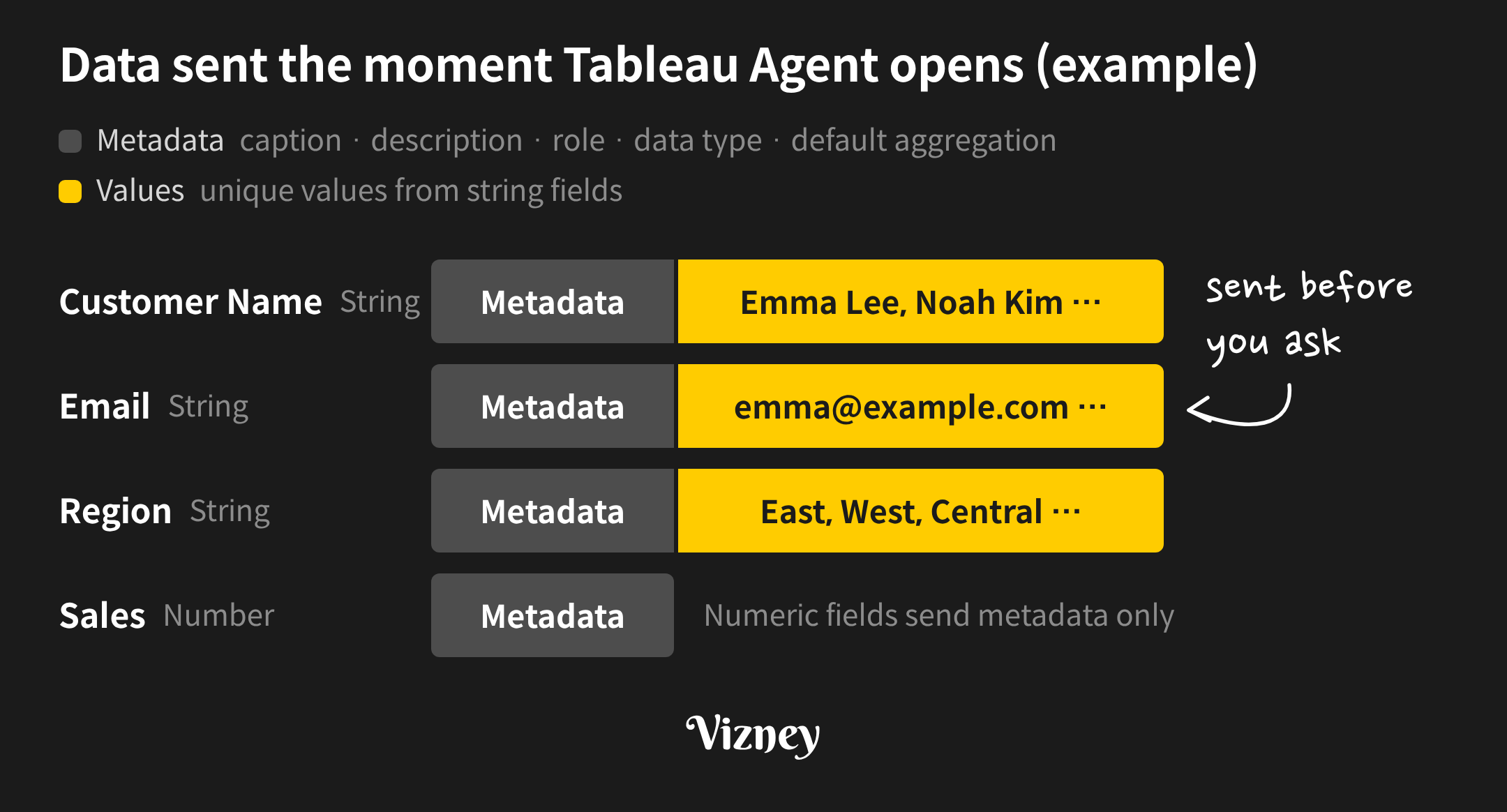
Inspecting the requests the browser sends to Tableau Cloud on version 2026.3.4 showed the same behavior. On a sample data source with 39 fields, every unique value of the 17 string fields was sent before any question was typed, including first-name and last-name fields. After hiding one field and reopening Tableau Agent, that field was gone from both the metadata and the values. This check covers the path from the browser to Tableau Cloud; the path from there to the LLM follows the official documentation.
It is better to keep fields with personal data out of the data sources you use with AI. Tableau Agent in Tableau Desktop follows one of the two paths below, depending on whether you are signed in to Tableau Cloud or Tableau Server.
2. How does data flow in Tableau Cloud?
In Tableau Cloud, both requests and responses pass through the Einstein Trust Layer. The Trust Layer can mask personal data before a request is sent, then checks the response for toxicity and restores the masked values. Based on AI in Tableau and Trust, these are the points to review:
- Model: Tableau Cloud uses Azure OpenAI models under Salesforce's agreements. Tableau selects the model; customers can't choose it.
- Region: Requests go to the nearest Azure OpenAI instance based on the Data 360 (formerly Data Cloud) region of your connected Salesforce org. If a model isn't available there or capacity runs short, requests are routed to the US region.
- Retention and training: Under zero data retention policies with the LLM providers, data sent to the LLM isn't retained and is deleted once the response is returned. Customer data isn't used to train any global model.
- PII masking: Pattern-based masking can replace personal data with generic tokens. However, the supported languages list notes that pattern-based masking and toxicity detection aren't currently supported for Tableau Agent in Korean, Portuguese, and French (Canada).
- Audit trail: With Tableau+, prompts, responses, and trust signals such as toxicity scores are logged in Data 360.
If your users work in one of those languages, don't design PII protection around masking.
3. What changes in Tableau Server?
AI requests in Tableau Server don't go through the Einstein Trust Layer. Tableau sends the user's question and a small random sample of values per field directly to the LLM provider your organization connects, and the connection options have grown with each release.
- OpenAI (2025.3 and later): Connect directly with your organization's OpenAI API key.
- Azure OpenAI (2026.2 and later): Connect to chat and embedding models deployed in your Azure resource.
- Custom Gateway (2026.3 and later, Beta): Route requests through your corporate LLM gateway to the model you choose. Authentication options are none, API key, or OAuth.
With this design, your organization owns data protection. Because Trust Layer masking and toxicity checks don't apply, data handling and PII protection follow your agreement and settings with the LLM provider. Row-level security applied through data source filters is still respected.
A Custom Gateway also lets you record exactly what leaves Tableau. Tableau's published Beta API spec is based on the OpenAI standard and defines two endpoints, /embeddings and /chat/completions; Tableau uses an embedding model to process data context and chat models to understand requests and perform analytic tasks. Tableau Server adds Tableau-User, Tableau-UserEmail, Tableau-SiteName, and Tableau-LLMModel headers to both requests, so logging bodies and headers at the gateway shows what each user sends. Aggregate usage on the Tableau-User header, which is always present.
4. Which setup fits your organization?
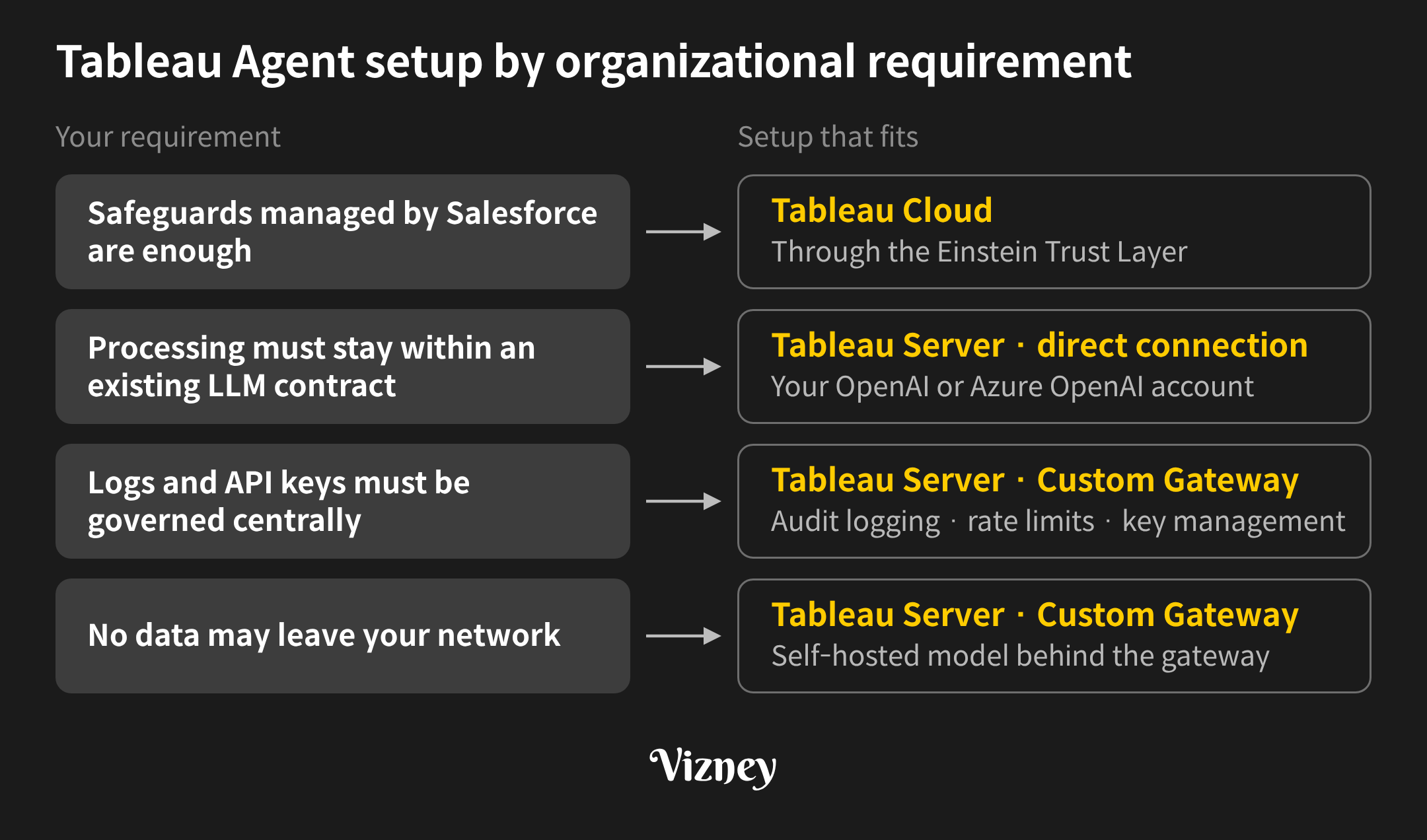
The deciding question is whether data may leave for an external LLM and, if so, under whose contract and controls.
- Safeguards managed by Salesforce are enough: Tableau Cloud fits. Salesforce operates the model agreements, zero data retention, and toxicity checks, and Tableau Agent requires Tableau+ or Tableau Cloud+.
- Processing must stay within an existing LLM contract: Connect Tableau Server directly to your OpenAI or Azure OpenAI account. Retention and training terms follow that agreement.
- Logs and API keys must be governed centrally: A Custom Gateway lets you align audit logging, rate limits, centralized key management, and network perimeters with your AI team's policies.
- No data may leave your network: Place a self-hosted model behind the Custom Gateway. A gateway alone doesn't keep data inside; where it sends the request does. Tableau recommends gpt-4o or later, or Claude Sonnet 4.6 or later, for analytic tasks, so validate response quality with a self-hosted model first.
As of 2026.3, Custom Gateway is in Beta for Standard, Enterprise, and Tableau+ editions. The Beta requires an intermediate gateway that complies with the published spec, and OAuth authentication rules out Tableau Agent in Dashboards (Beta, requires Tableau Server+). The AI setting in Tableau Server is site-specific and applies to every user on that site, so validate payloads and response quality on a test site first.
Whichever deployment you choose, what reaches the LLM comes from the data source Tableau Agent sees. Keep a separate published data source for AI without personal data fields, and build row-level security with data source filters. The Full Data Query permission required for Dashboard Q&A lets the agent reach the underlying data in the workbook's data source, beyond the summary data in the views, so decide who gets it as well.
Note:
This post is based on Tableau Help, the Tableau 2026.3 New Features page, and Tableau's published Beta API spec as of November 2026, and may change with future updates. Custom Gateway and Tableau Agent in Dashboards on Tableau Server are Beta features, so their scope may change before general availability.