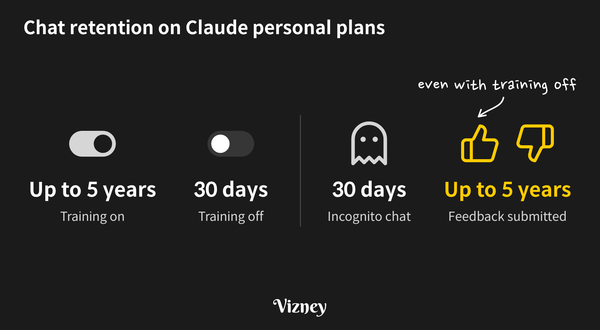
Knowledge Base Featured Using Claude at Work: Data Settings to Check on a Personal Plan The settings to check when you use a Claude personal plan for work, and the cases where conversations are retained even with training turned off.
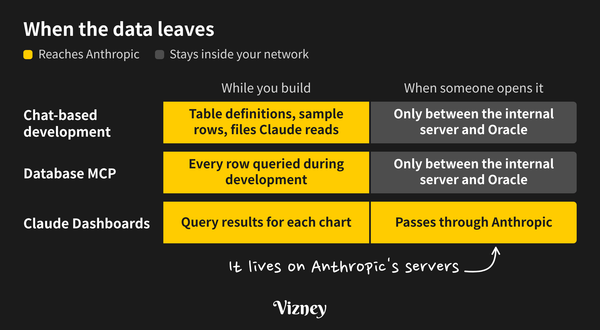
Knowledge Base Featured Claude Dashboards Data Security: What Reaches Anthropic vs. Chat and MCP Claude Dashboards, released in beta in October 2026, stores the query results behind each chart on Anthropic’s servers along with the dashboard. With live queries, the data goes through Anthropic’s cloud every time the dashboard opens. Building with Claude in chat and connecting a database through MCP also
Knowledge Base Tableau Licensing FAQ: What the Terms Say About Sharing Dashboards Common questions about sharing Tableau dashboards, answered with the clauses from Tableau’s contract documents.
Troubleshooting Fix Oracle 'ORA-01861' Error on Tableau Server for Linux Explains the cause of ORA-01861 errors with Oracle data sources on Tableau Server for Linux (session locale mismatch) and two ways to fix it: changing the service locale or using explicit date conversion.
Troubleshooting Fix Korean and CJK Fonts Not Displaying on Tableau Server on Linux When you publish a workbook to Tableau Server running on Linux, CJK text (Korean, Japanese, Chinese) may render differently from how it looks in Tableau Desktop. There are two common symptoms: * Characters appear as empty boxes (□, often called "tofu"). * Characters display, but in a fallback font. The change
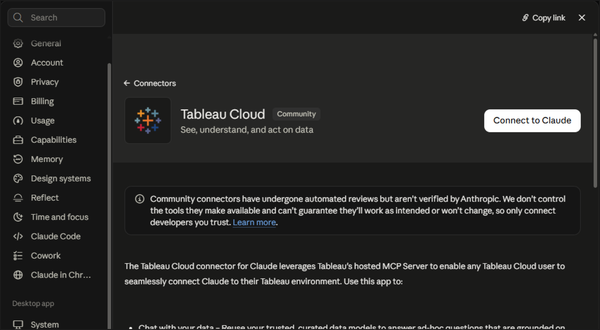
Knowledge Base Featured How to Connect Claude to Tableau Cloud If you use Tableau Cloud, add the Tableau Cloud connector from Claude's Connectors menu and sign in with your Tableau account. That's the whole setup — no Node.js, no config file, no Personal Access Token. Connecting 1. In Claude, go to Settings → Connectors. 2. Click Add
Troubleshooting How to Fix the "does not match a known configuration key" Error in Tableau Server Learn how to resolve the 'does not match a known configuration key' error during Tableau Server configuration import using the --force-keys flag or manual JSON cleanup.
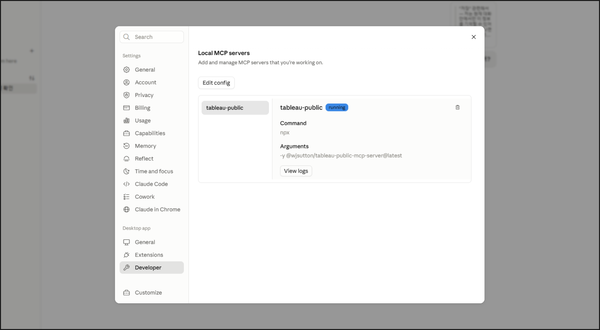
Knowledge Base How to Connect Tableau Public MCP to Claude Desktop Connecting the Tableau Public Model Context Protocol (MCP) server to Claude Desktop allows you to explore public dashboards, retrieve metadata, download .twbx workbooks, and reverse-engineer calculation fields and LOD expressions directly through natural language. This setup is based on the open-source project created and maintained by Tableau Visionary
Knowledge Base How to Check Physical CPU Cores and Memory on a Linux Server When sizing hardware for solutions like Tableau Server in a Linux environment, you must determine the actual "physical" core count and total memory. Here are the quick terminal commands to check these specifications. 1. Check Physical Core Count lscpu -p | egrep -v '^#' | sort -u -t, -k
Knowledge Base What is the Prompt Doom Loop? Why Your AI Output Gets Worse the More You Tweak It Whether it's coding, drafting proposals, writing emails, or translating, we constantly tweak our prompts to get the desired output from AI. Strangely, the more we try to fix it, the worse the output often becomes. Recently, this phenomenon has become a hot topic among AI developers and is
Knowledge Base Difference Between DX and AX Currently, one of the most frequently used terms in the IT and business sectors is AX (AI Transformation). Just as organizations were getting comfortable with DX (Digital Transformation), this new buzzword emerged, leaving many professionals confusing the two concepts. It is easy to assume, "Isn't AX just
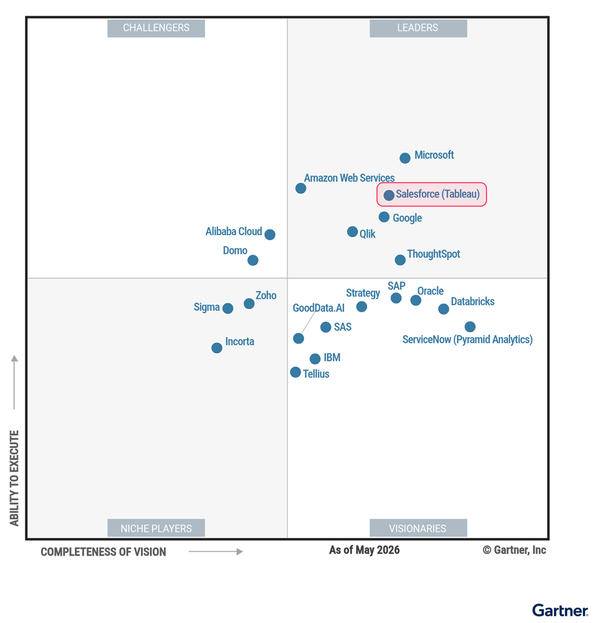
News 2026 Gartner Magic Quadrant Analysis: ABI Market Trends and Tableau's Leadership The recently published '2026 Gartner Magic Quadrant for Analytics and Business Intelligence (ABI) Platforms' report evaluates the latest trends in the data analytics market and the market positions of key vendors.This post summarizes the shifting currents of the ABI market and the core competitive advantages of Salesforce&
Knowledge Base Difference Between 'Show Empty Rows' and 'Show Missing Values' in Tableau When using [Show Missing Values] or [Show Empty Rows] to visually pad missing dates in Tableau, users often get frustrated when the dates don't automatically fill from the 1st to the 31st of the month. The first universal principle to understand is that Tableau’s padding does not
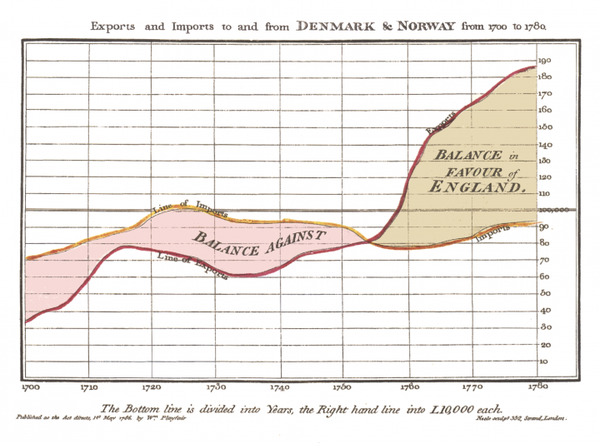
Knowledge Base The History of Data Visualization In our daily lives and at work, we create countless charts using tools like Excel and Tableau. But when and by whom was this revolutionary idea of transforming dense rows of numbers into intuitive graphics first introduced? Come to think of it, replacing complex figures with shapes or line lengths
Knowledge Base What is Tableau MCP? Understand the core concept of the Model Context Protocol (MCP) and explore how Tableau MCP securely connects external AI agents to your governed enterprise data.
Knowledge Base What is Tableau Next? An introduction to Tableau Next, the newly released analytics platform from Tableau.
Knowledge Base What is Tableau Semantics? An introduction to Tableau Semantics, the AI-infused semantic layer that serves as the centralized framework for enterprise knowledge and data trust.
Knowledge Base What is a Semantic Layer? As Artificial Intelligence (AI) and Large Language Models (LLMs) rapidly integrate into the world of enterprise data analytics, a specific keyword has emerged as the hottest topic in data architecture: the "Semantic Layer." In an era where AI agents replace traditional dashboards and converse directly with users to
Knowledge Base How to Name Your Tableau Data Source to Prevent AI Hallucinations (Tableau Pulse & Copilot) Many administrators who have introduced AI features like Tableau Pulse or Einstein Copilot into their Tableau environments are struggling with "hallucinations"—situations where the AI fetches the wrong data to answer user questions. The biggest cause of these AI hallucinations lies in the messy 'Data Pane'
Troubleshooting How to Fix the 'Error Code: 6EA18A9E' Error in Tableau When building a view or using specific features in Tableau Desktop, you may encounter an internal error message that interrupts your work: Unable to complete action Internal Error - An unexpected error occurred and the operation could not be completed. Error Code: 6EA18A9E The exact cause of this error code is
Troubleshooting How to Fix the 'An error occurred' Error When Using Tableau Agent When configuring the OpenAI API for Tableau Agent in Tableau Server (version 2025.3 or later), the connection test in the settings may show as 'Success', but the following error message might appear when attempting to use the feature in web authoring: An error occurred. Please try again.
Knowledge Base How to Name Calculated Fields and Parameters Like a Pro Following our guide on naming dashboard chart titles, let's look at another crucial factor that affects efficiency for dashboard creators: naming calculated fields and parameters. Unlike default fields in a data source, custom calculations and parameters require clear naming conventions. Establishing these rules from the start drastically reduces
Knowledge Base Tableau License Decision Guide Successfully adopting Tableau requires configuring the optimal license structure tailored to your organization's data infrastructure and utilization goals. Beyond simply purchasing licenses based on the expected number of users, you must comprehensively consider where to store the data (Hosting), what level of security and management features are needed
Troubleshooting How to Fix the 'HTTP Bad Request' Error When Publishing to Tableau Server When publishing a workbook created in Tableau Desktop to Tableau Server or Tableau Cloud, you may encounter the following error message, and the publishing process will stop. Unexpected Error An error occurred while publishing the workbook. Error Code: 0505B44A HTTP bad request This error primarily occurs when the 'Project
Knowledge Base How to Name Dashboard Charts Like a Pro When building a dashboard or creating charts, we often spend an unnecessary amount of time figuring out what to name our sheets rather than focusing on the actual data visualization. To save you from this hassle, we have put together a straightforward, standardized naming guide. The Perfect Basic Formula The