
Improving Data Visibility with Emoji Number Formats in Tableau

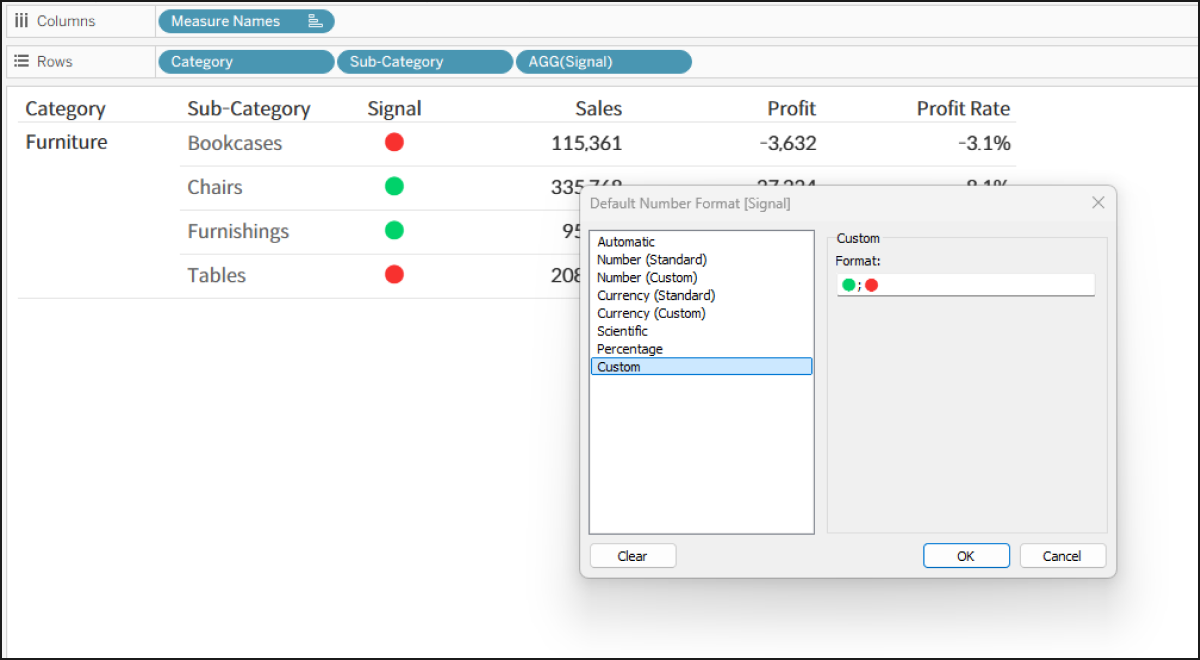
When building dashboards, displaying categorical data like 'Achieved/Failed' or general statuses purely as text can lack visual impact.
While using Shape marks is a common workaround to add visual cues, it can be cumbersome when you simply want to add a quick highlight directly within a Text Table. In such cases, utilizing Tableau's Custom Number Format feature is a highly efficient way to transform your data into intuitive emojis without altering mark types.
Tableau's custom number formatting follows a specific syntax separated by semicolons (;): Positive; Negative; Zero.
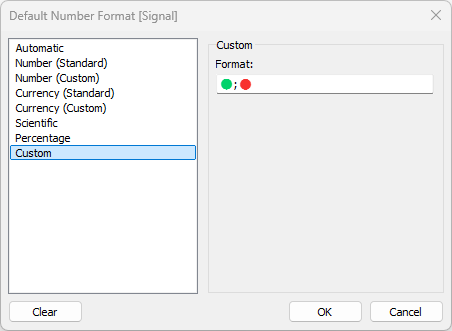
By creating a calculated field that converts your 2 to 3 string categories into positive (1), negative (-1), and zero (0) values, you can simply enter your desired emojis (e.g., 🟢;🔴;⚪) into the custom format field in that exact order. If you only have two outcomes, such as achieved or failed, entering 🟢;🔴 works perfectly.
Once this field is placed in the view, the numbers instantly appear as emojis, allowing users to recognize the status of the data much faster and more intuitively.