
Claude Data (formerly Claude Dashboards) Security: What Reaches Anthropic vs. Chat and MCP

Updated November 14, 2026: Claude Dashboards has been renamed Claude Data and is now generally available. This post now covers live sharing (beta) and the new Enterprise default.
Claude Data (formerly Claude Dashboards), generally available since November 2026, stores the query results behind each chart on Anthropic’s servers along with the dashboard. With live queries, the data is queried again through Anthropic’s cloud when someone opens the dashboard and it is due for a refresh. Building with Claude in chat and connecting a database through MCP also send data to Anthropic, but the data leaves at a different point. This post breaks down what reaches Anthropic in each approach and what to check before a security review.
With chat-based development and MCP, data leaves only while you build; the finished dashboard queries the database directly from an internal server. A Claude Data dashboard, by contrast, lives on Anthropic’s servers. Data therefore passes through Anthropic whenever someone opens it, long after the build is done. Here is how that plays out for a monthly sales dashboard on an on-premises Oracle database.
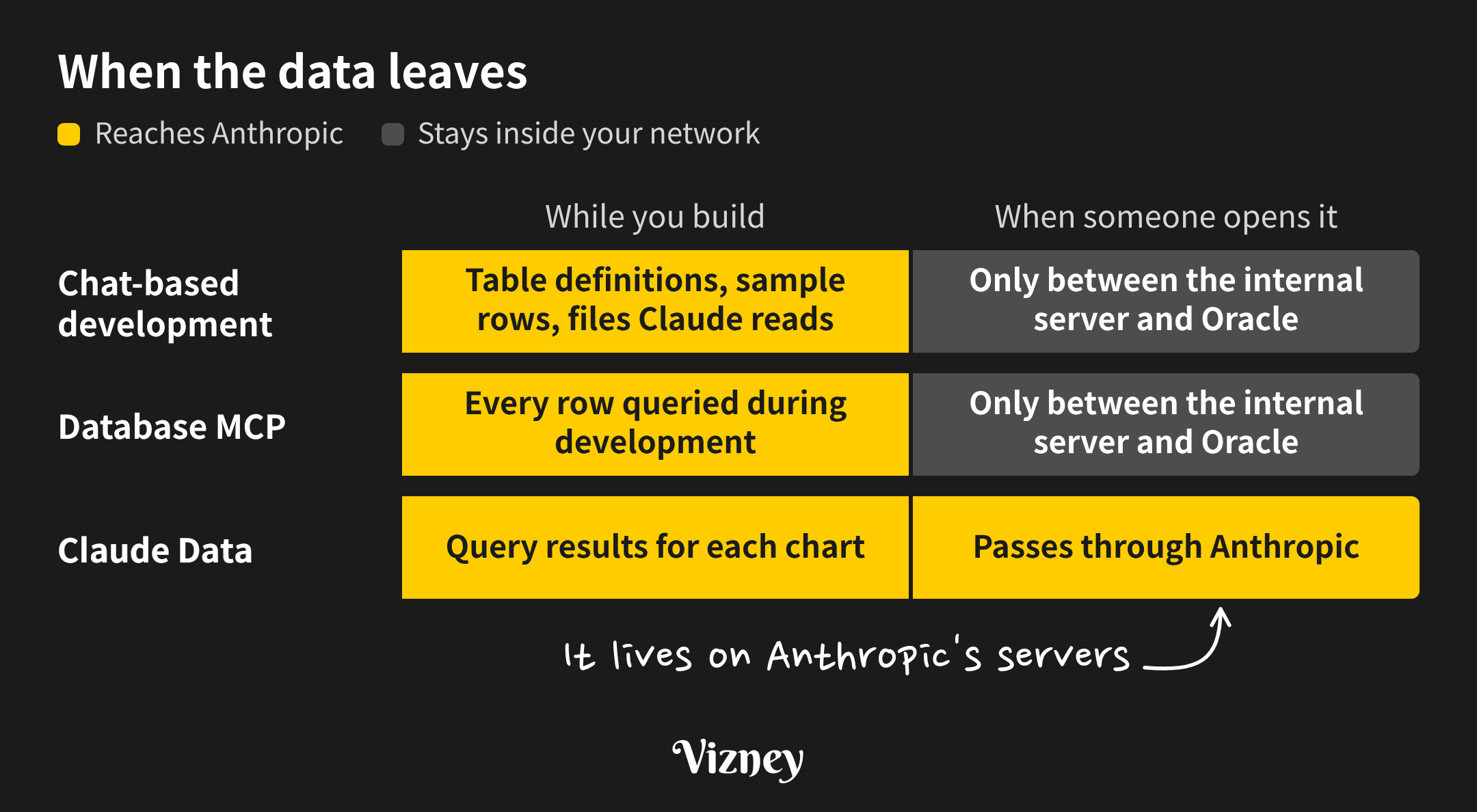
- Chat-based development: You describe the tables and requirements, and Claude writes the SQL and front-end code. What reaches Anthropic is what you paste or attach (table definitions, sample rows, error messages) plus any files Claude reads. A
.envfile with database credentials also reaches Anthropic if Claude reads it, so keep credentials outside the paths Claude can read. Once the code is deployed to an internal server, viewer data travels only between that server and Oracle. - Database MCP: With a local MCP server such as Oracle’s SQLcl MCP Server connected to Claude Desktop, queries run from your machine over the internal network. The results, however, return to the conversation as tool results and go to Claude. As a result, every row queried during development is sent to Anthropic with the conversation. After deployment, viewing works the same as with chat-based development.
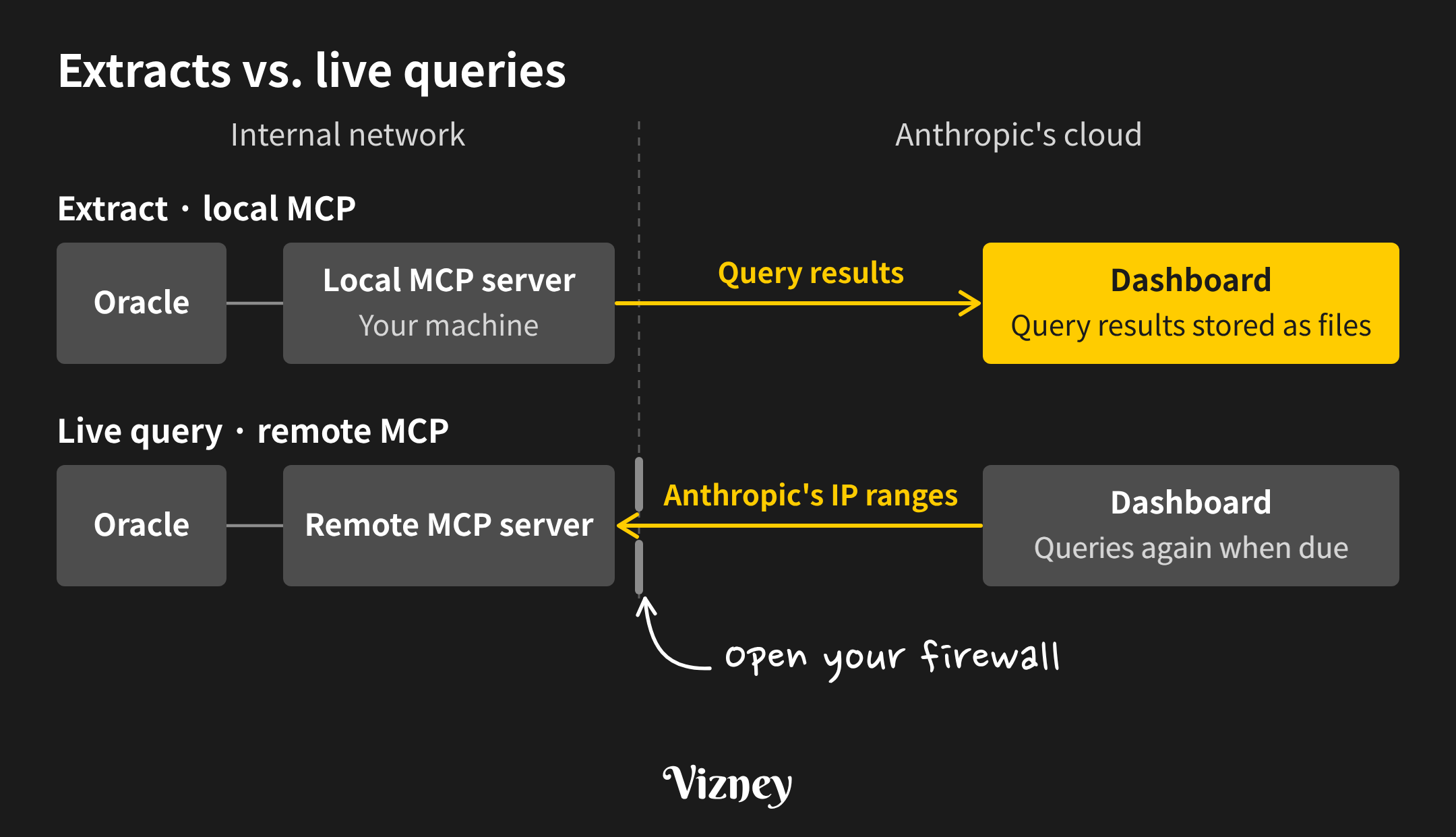
- Claude Data: Claude writes and runs a SQL query for each chart and bundles the results into datasets. The dashboard is saved to your Claude account separately from the chat and can be shared. In Tabular Editor’s testing, a local MCP server could only supply extracts. The query results are then stored as files inside the dashboard, and anyone who can open the dashboard can read them. Live queries that go back to the source need a remote MCP server, and remote MCP servers are reached from Anthropic’s cloud. To connect an on-premises Oracle database live, you must open your firewall so that Anthropic’s IP ranges can reach the MCP server in front of it.
What to check before a security review
- Plan and training settings: On consumer plans (Free, Pro, Max), turning on the model improvement setting (Help improve our AI models) allows training on your chats and retention in de-identified form for up to five years. Team, Enterprise, and API usage falls under the Commercial Terms and is not used for training by default. Training and transmission are separate questions, though. On every plan, chats and dashboards are stored on Anthropic’s servers.
- Retention and deletion: Deleted chats are generally removed from backend storage within 30 days. Dashboards are saved separately in the Artifacts tab, so manage them separately from chats.
- ZDR scope: A Zero Data Retention agreement covers only eligible APIs, products using your commercial organization’s API key, and Claude Code on Enterprise plans. It does not cover chats or dashboards in the Claude apps.
- Feature access: Claude Data is generally available on Pro, Max, Ultra, Team, and Enterprise; certified queries and live sharing are in beta. On Team, Claude Data and both beta features are on by default. On Enterprise, Claude Data turns on by default on November 19, 2026, unless an owner has already saved a setting, and both beta features are off by default. Owners change these settings in Organization settings > Artifacts, and Enterprise owners can limit Claude Data to specific groups with custom roles.
- Sharing: On Team and Enterprise, dashboards stay inside your organization by default, and an owner decides whether users can share outside it. Email invitations to people outside the organization (beta) are on by default on Team and off on Enterprise. For people outside the organization, the parts of a dashboard that use connectors don’t work. On Pro, Max, and Ultra, everyone other than you counts as outside. Inside the organization, each viewer’s own connections run the queries, so anyone without access to a source sees an error in that part of the dashboard.
- Live sharing (beta): The exception is live sharing. With it on, people in your organization see results from the sharer’s connection, including saved results, even without access to the source. Only the results of the queries the dashboard needs are shared, and viewers can’t run other queries with that access. For a dashboard with live sharing on or with stored extracts, its sharing scope is its data exposure scope.
- MCP path and credentials: Local MCP servers connect over your machine’s network, while remote MCP servers are reached from Anthropic’s cloud. On Team and Enterprise, if a connector itself is set up with a shared credential such as an API key, everyone who uses it queries with that credential’s access, whether or not live sharing is on.
- Query scope: The queries Claude runs determine how much data leaves. Give the MCP connection a dedicated account that can read only the views it needs, and leave PII columns out of those views.
Which approach to use depends on the data involved.
- Exploring public or approved data: Claude Data is a good fit. One question produces a dashboard, and each chart shows its query.
- Development on sensitive sources: Use database MCP, with a dedicated account and views to limit what leaves.
- Dashboards many people use over time: Run them on your BI platform, or deploy what you built through chat or MCP to an internal server. Viewer data stays inside your network.
Claude Data is generally available, but certified queries and live sharing are in beta, so recheck sharing and connector behavior in the official help center when you adopt it.