Troubleshooting How to Fix Data Blending Error with Logical Tables in Tableau "Data sources that contain logical tables cannot be used as secondary data sources for data blending." This error occurs because Tableau's newer data model, Relationships (logical layer), conflicts with the older method of combining data known as Data Blending. In a data blend, the secondary data
Knowledge Base What is Scrollytelling? In the world of data visualization, going beyond simply displaying data to delivering a clear message and immersing the reader is a significant challenge. Today, let’s talk about one of the most effective data storytelling techniques: Scrollytelling. Defining Scrollytelling Scrollytelling is a portmanteau of 'Scroll' and '
Knowledge Base Tableau Prep Guide In data analysis projects, it is often said that Data Preparation accounts for 80% of the total time spent. While transforming raw data into an analysis-ready format is essential, it is also a repetitive and time-consuming task. In this post, we will introduce Tableau Prep, a tool that
Knowledge Base Tableau Server Guide: Architecture & Core Process When operating Tableau Server, you may encounter various technical issues, such as slow dashboard loading speeds or extract refresh failures on specific nodes. To resolve these problems based on logic rather than intuition, it is essential to accurately understand how Tableau Server works internally—specifically, its Architecture. In this post,
Knowledge Base Tableau API Guide Tableau offers a variety of APIs for different purposes such as automation, integration, and extension. However, because there are so many API types—each with its own goals—it can be difficult for first-time users to decide which API to use. This post briefly introduces Tableau’s APIs and
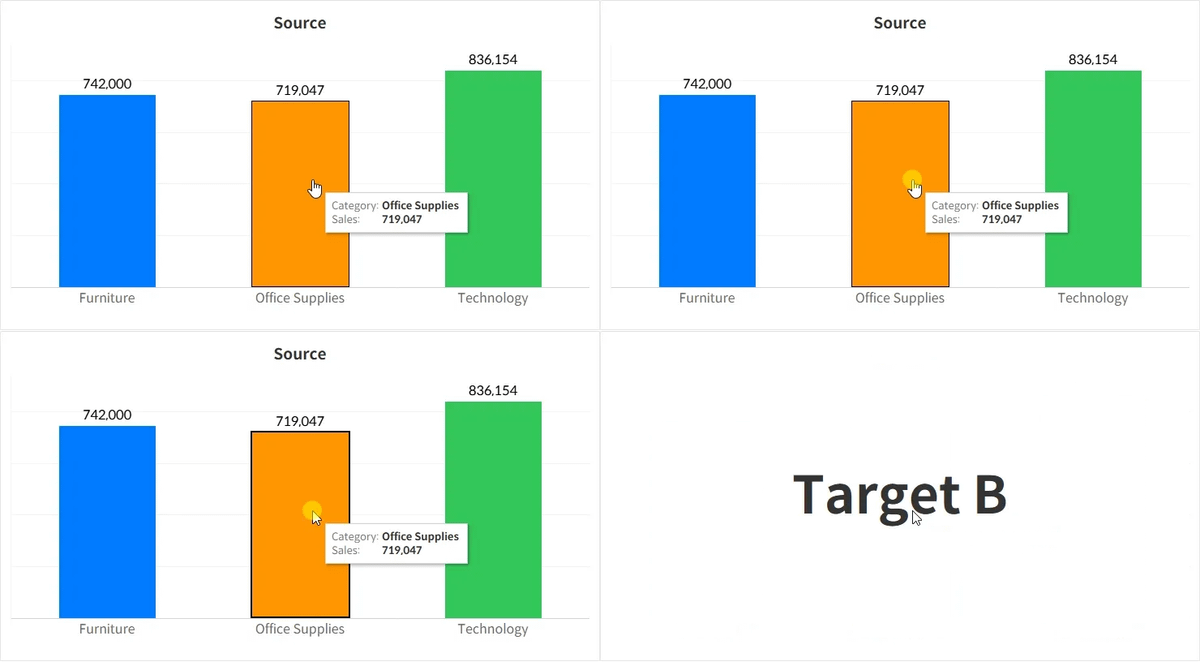
Knowledge Base Tableau Dashboard Action Execution Order When setting up dashboard actions in Tableau, you might sometimes create multiple actions with the same trigger condition. For example, both actions may filter by the Category field, but each targets a different dashboard. Action NameTrigger ConditionTarget Sheet (or Dashboard)Action AOn selecting CategoryTarget AAction BOn selecting CategoryTarget B In
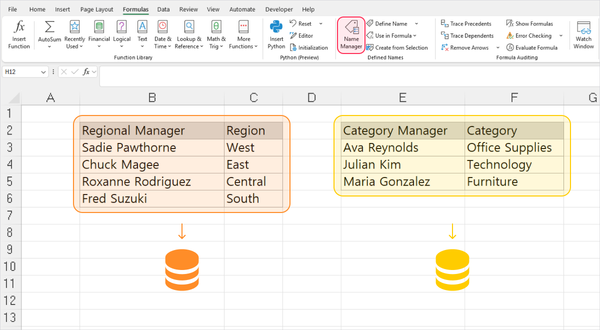
Knowledge Base How to Import Different Tables from One Excel Sheet into Tableau Users who are accustomed to Excel’s high degree of flexibility often store different types of tables within a single worksheet. While the standard approach for importing such data into Tableau is to separate each table into its own worksheet, you can instead use Excel’s Name Manager feature to
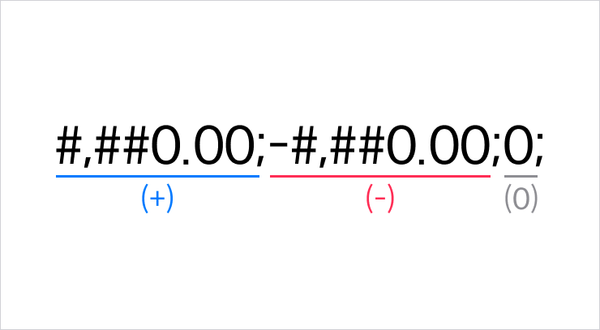
Knowledge Base How to use Custom Number Formatting in Tableau When building visualizations in Tableau, there are times when you need precise control over how numbers are displayed. For example, you may want to simplify figures by displaying them in millions, add specific suffixes, or format negative numbers with parentheses. To meet these needs, Tableau provides the Custom Number Formatting
Knowledge Base Why Is Serial Number 1 Dated December 31, 1899? When converting a date to a number in Excel, Google Sheets or Tableau, you'll notice that the value 1 represents a specific point in time. In Excel, that number corresponds to January 1, 1900, but in Google Sheets and Tableau, it points to December 31, 1899. Why do
Knowledge Base Why "No." is the Abbreviation for "Number" In our daily lives, we often see "Number" abbreviated as "No.". For example, when creating a list or indicating order, we use "No. 1," "No. 2," and so on. But if you look closely, the word "Number" doesn't contain the letter 'o' at all. So, why did "No." become the abbreviation for "Number"?
Knowledge Base Using Date Constants in Tableau Calculated Fields This is a method you can use when writing calculated fields that compare against a specific date.
Knowledge Base Difference Between Top and Bottom Date Aggregation Options in Tableau This post explains the confusing aggregation options that often appear when working with date fields in Tableau.
Knowledge Base Difference Between Blue and Green Fields in Tableau Many people assume that blue fields are dimensions and green fields are measures. While this assumption often holds true, it’s not technically accurate. In this post, we’ll break down what these colors actually mean and how understanding them can improve your visualizations.
Knowledge Base Understanding FIXED LOD Expressions in Tableau LOD expressions allow you to perform calculations at a specific level of granularity, independent of the aggregation level currently used in your visualization. Among them, FIXED is a particularly useful function that lets you fix aggregations at a dimension level defined by the user.
Knowledge Base Difference Between Tableau Public and Tableau Desktop This article explains the key functional differences between Tableau Public and Tableau Desktop from the perspective of dashboard creation.
Knowledge Base Run Your Under Development Connector in Tableau Desktop This guide explains how to run Tableau Desktop without signature verification while developing a Tableau connector for a new data source.
Knowledge Base Difference Between Client-side and Server-side Rendering in Tableau This post explores the advantages depending on where the view is rendered.
Knowledge Base Difference Between Standard Gregorian and ISO-8601 This section explains the differences between the Standard Gregorian and the ISO-8601 Week-Based in date calculations.
Knowledge Base What is Business Intelligence Business Intelligence(BI) refers to the entire process that a company uses to make informed business decisions. BI involves several key steps, including collecting data from various internal and external sources, transforming it into meaningful insights, and then visualizing it to help guide decision-making. Data collection can include not
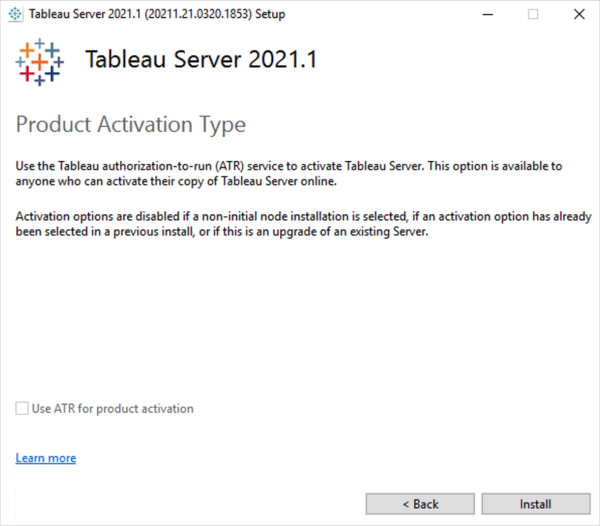
Knowledge Base How to Check If Tableau Server Is Using ATR Here’s how you can verify whether your Tableau Server is configured to use ATR (Authorization-To-Run).
Knowledge Base How to Open Links in Separate Tabs in Tableau Here's way to open links from URL actions and web URLs in separate browser tabs and not in the same view or dashboard.
Knowledge Base How View URLs Are Structured in Tableau This is the URL pattern that gets generated when you publish a view to Tableau Server or Tableau Cloud.
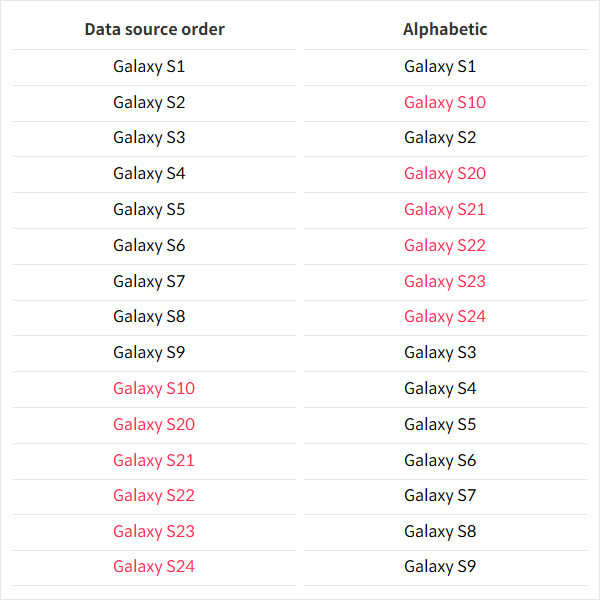
Knowledge Base Differences Between Data Source Order and Alphabetic in Tableau Sorting This post introduces the difference between two basic sorting options in Tableau that sort purely by the field’s values.
Knowledge Base How to Add a Placeholder to Your Tableau Data Source This method explains how to connect Placeholder data, giving you more flexibility—similar to Excel—and enabling a broader range of visualizations.
Knowledge Base Understanding Tableau Data Connectivity (ODBC, JDBC) This post will introduce the basic concepts behind Tableau connectors and explain the fundamentals of ODBC and JDBC connection methods.