
Tableau Data Apps: Custom Analytics Apps Built with AI and Hosted by Tableau

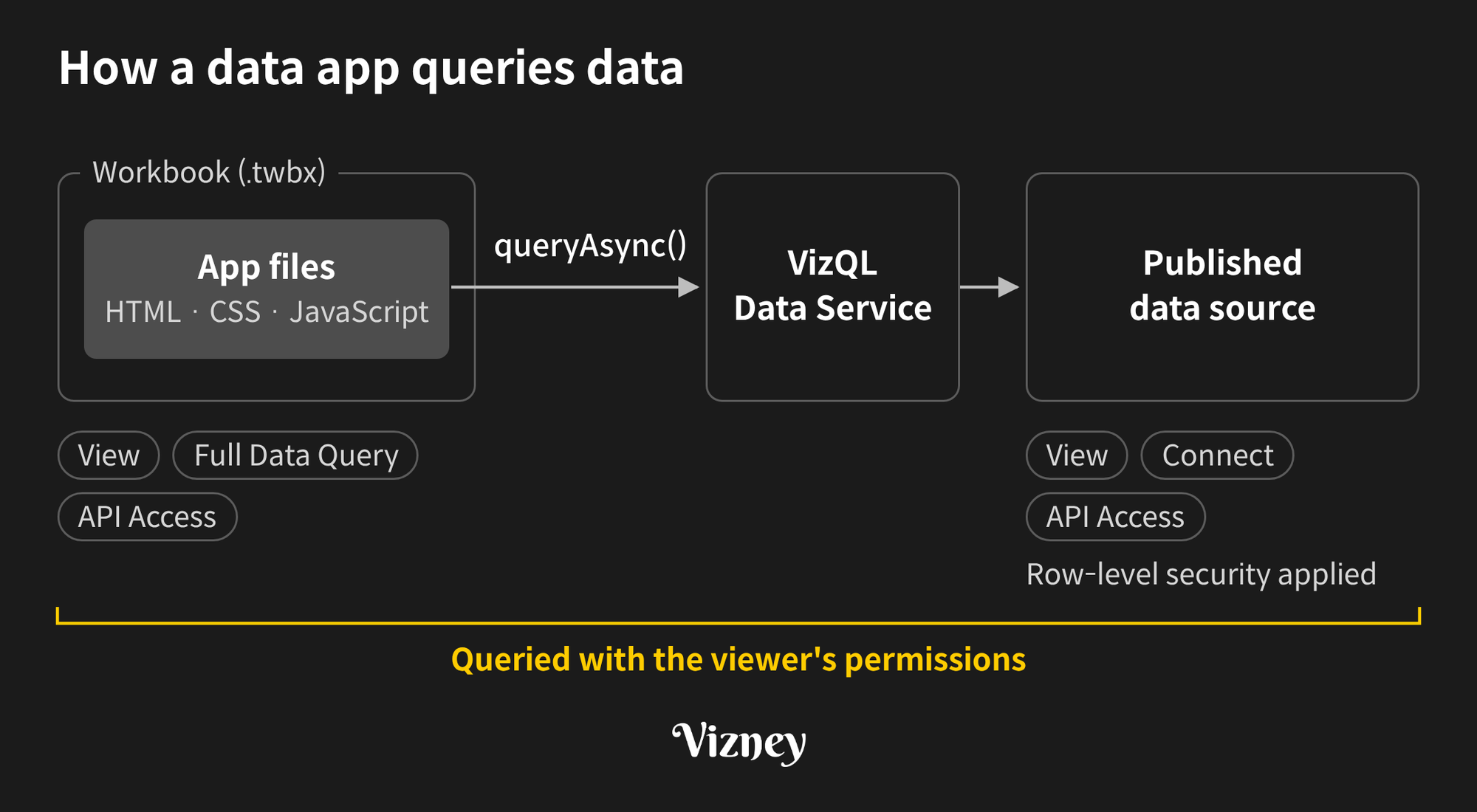
Tableau Data Apps let you package a code-built analytics web app inside a workbook and have Tableau host it. The app queries published data sources live with the viewer's permissions. Tableau announced the beta on its official blog on November 3, 2026, defining a data app as "a custom, interactive, analytical web app hosted and powered by the Tableau platform."
Until now, when you needed an interface Tableau doesn't offer, you had two options: a separately hosted extension, or HTML built from pasted data. Data apps let you run AI-built interfaces inside Tableau, with Tableau's data and permissions intact.
- What it is: Tableau-hosted, code-built interactive analytics web apps
- Deployment: App files (HTML, CSS, JavaScript) are packaged in the workbook (.twbx) and published with it, so no separate web server is needed.
- Data: The app queries data sources at runtime with
queryAsync(), with the viewer's permissions and row-level security applied. - How to build: Tableau Studio, or an AI agent (Claude, ChatGPT, Codex) connected to Tableau MCP
- Status: Beta; per the developer docs as of November 7, 2026, available only on Tableau Cloud.
1. What can Tableau Data Apps do that wasn't possible before?
Data apps let you build interfaces Tableau doesn't offer, with code, and run them inside a workbook. You don't need a separate server, and the app uses Tableau's own data and permissions.
- No separate server: Network-enabled dashboard extensions run only when the web app is hosted on an external host and the extension is on the site's safe list. Data apps are packaged in the workbook and published with it, so the front end needs no web server. Tableau hosts the packaged web resources only; it doesn't provide a runtime for server-side code.
- The app queries what it needs: The app requests the fields it needs from the data source with
queryAsync(). Because it queries at runtime instead of storing a fixed copy in code, it reuses your extract refreshes and row-level security. - Governed data behind AI-built interfaces: HTML built from pasted data is a snapshot. It won't refresh, and row-level security doesn't apply to it. A data app runs as the viewer, and according to Tableau's blog, database credentials are never exposed to the app or the agent.
- Built through conversation: The Get Started guide has you describe the app's purpose, audience, data source, metrics, and controls to an AI client. It states: "You do not need to write the application code or assemble the workbook package yourself."
The official sample rebuilds the Superstore workbook as a five-tab data app, with a map, a heatmap, scatter plots, and shipping-delay classification. It requires Tableau 2026.3.1 or later. Tableau positions data apps as living "alongside your existing dashboards."
2. How do Tableau Data Apps work?
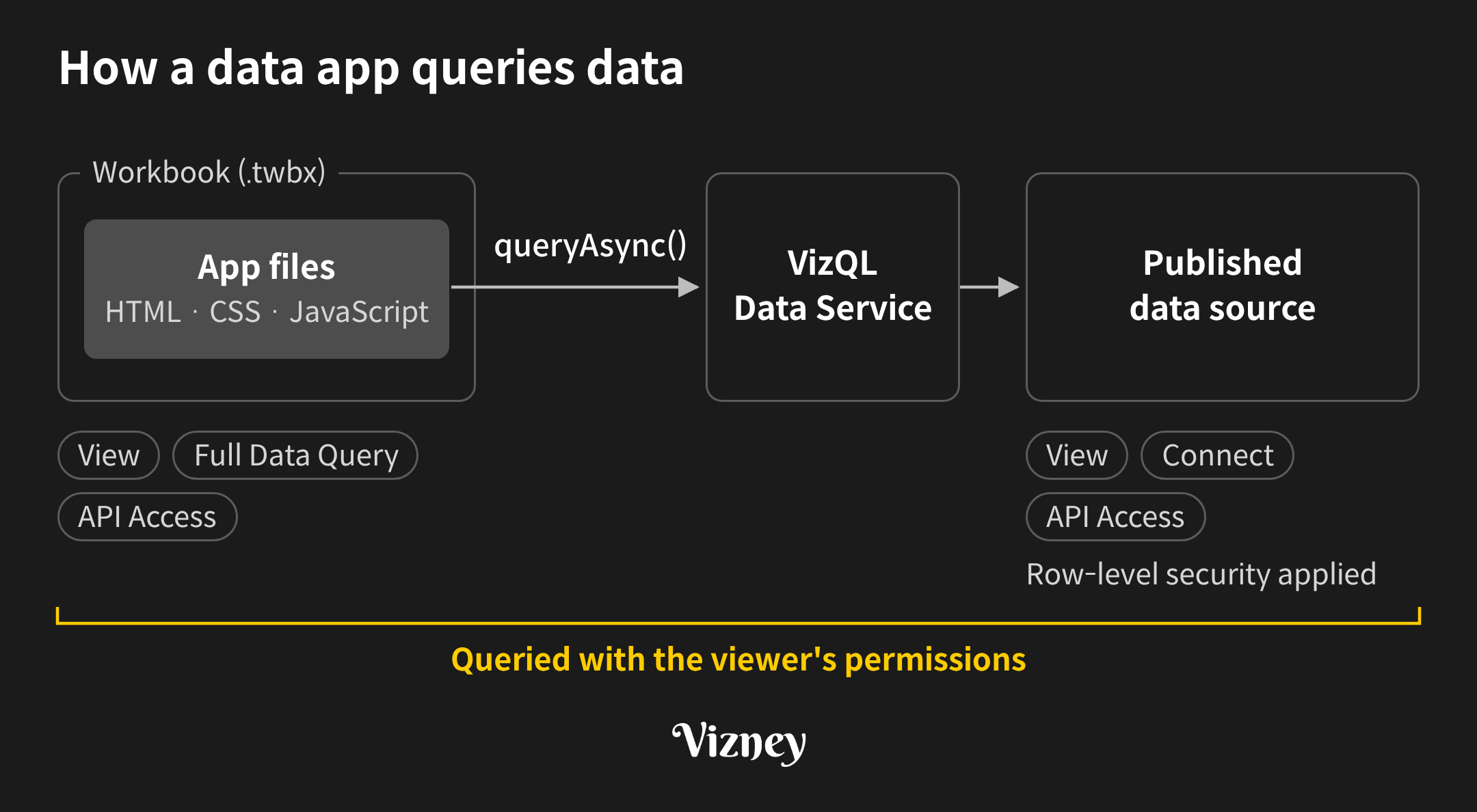
The app files in the workbook call queryAsync(), and the request goes through VizQL Data Service to query the published data source. These queries run with the viewer's permissions.
The viewer needs permissions on both the workbook and the data source:
- Workbook: View, Full Data Query, and API Access
- Data source: View, Connect, and API Access
Any row-level security on the data source still applies. API Access is the capability that lets a user query data sources through VizQL Data Service.
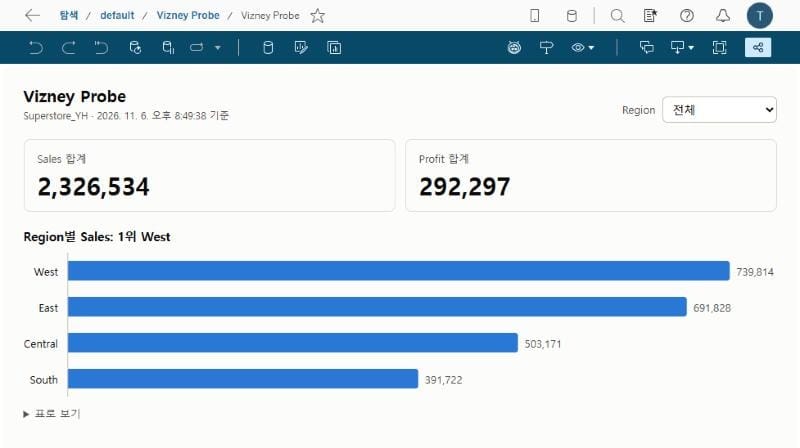
We confirmed this with a data app we published to Tableau Cloud (2026.3.3) on November 6, 2026. queryAsync() requests went to /api/v1/vizql-data-service/query-datasource on the same host. The app ran in a sandboxed frame, and the response's Content Security Policy (CSP) listed no external origins.
To call external APIs, an app can use only origins an administrator has allowed. Tableau REST API calls work the same way: the Extensions API fetch() sends only a curated set of requests, within the scope the administrator allows.
3. How do you build Tableau Data Apps, and where can you use them?
Tableau's blog describes two ways to build a data app:
- Tableau Studio: Switch between AI prompting and drag-and-drop editing, then publish to Tableau Cloud or Tableau Server.
- Third-party AI agents: Connect Claude, ChatGPT, or Codex to Tableau MCP or Tableau Next MCP, then publish to Tableau Cloud, Tableau Server, or Tableau Next.
The two official sources describe availability differently. The blog lists those publishing targets, but the developer docs state, "The data Apps beta is available only on Tableau Cloud" (as of November 7, 2026).
The Get Started guide requires:
- A Tableau Cloud site that supports the beta
- A Creator or Explorer (can publish) role
- A published data source you can access
- An AI client that supports MCP, the Tableau plugin, and code execution
The AI agent then works through these steps:
- Creates the workspace with
scaffold-data-app. - Connects the data source.
- Writes the app, including loading, empty, and error states.
- Packages a .twbx and publishes it through Tableau MCP.
For installation steps, see the Get Started guide. For Tableau MCP itself, see Tableau MCP.
We followed this route in Claude Code. Publishing took 7 minutes 22 seconds from the moment we switched data sources; details are in Permissions and Admin Approval Required to Publish a Tableau Data App.
4. What should you check before using Tableau Data Apps?
Check three things first: permissions, site settings, and security review.
- Creator permissions: A Creator or Explorer (can publish) role, Publish and Overwrite on the target project, and View, Connect, and API Access on each data source the app uses.
- Viewer permissions: View, Full Data Query, and API Access on the workbook, plus View, Connect, and API Access on each data source. Being able to open an app doesn't grant additional permissions on its data sources.
- Site settings: Data apps are enabled per site with "Allow Packages on this Site." External origins and REST API calls work only within what the administrator allows.
- Security review: Review the app code and third-party libraries, and keep passwords and access tokens out of the package. Test with representative viewer accounts, including restricted ones.
In our test, creator permissions were the first blocker. The shared data source in the Samples project had no API Access, so our query was refused while we were still checking fields, before the app was built. Fixes for the errors we hit are in Fixing Permission, Script, and Publishing Errors When Building Tableau Data Apps.
In practice, start with interfaces your existing dashboards can't handle, and share a data app only after code review and a permission check. As building interfaces gets cheaper, deciding who looks at a screen and what decision they make there matters more to its quality.
Note:
This post is based on Tableau's official blog and Extensions API developer docs as of November 7, 2026, and on a data app we published to Tableau Cloud (2026.3.3) on November 6, 2026. Features and requirements may change during the beta.